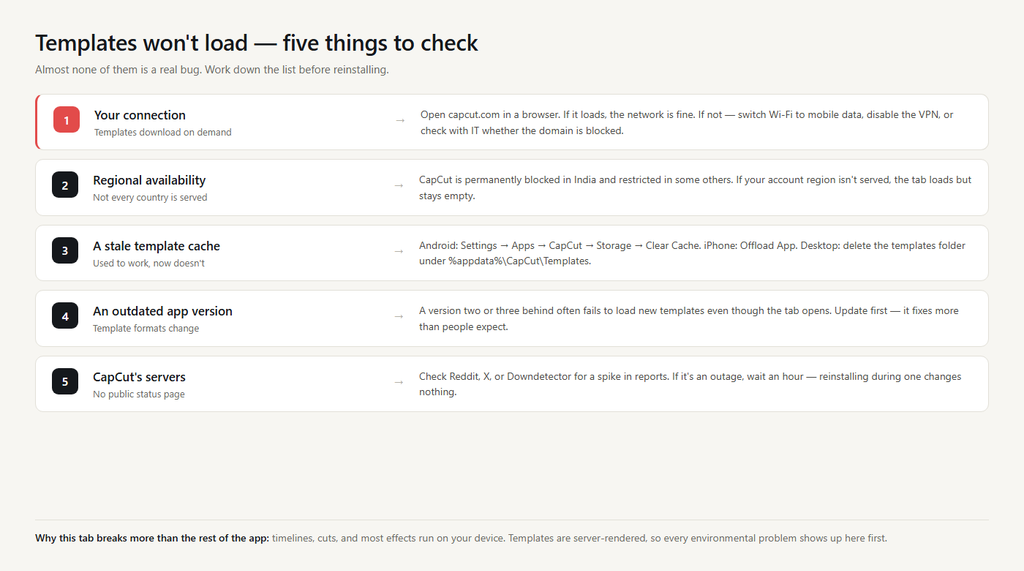
The template tab is where most people go first because it’s the obvious feature, and when it doesn’t load it feels like the app is broken. It’s almost never actually broken. Templates are server-rendered, which means five environmental things can stop them — and only one of them is a real bug.
Fix 1: Check the connection first
Templates download from ByteDance’s servers every time you open the tab. If your connection is weak, on a corporate network with the relevant domains blocked, or behind a VPN that routes through a region CapCut doesn’t serve, the tab will show empty boxes, grey placeholders, or a spinning loader that never resolves.
Try the simplest test: open capcut.com in a browser. If it loads, your network isn’t the issue. If it doesn’t, the problem is at the network level — switch from Wi-Fi to mobile data, disable the VPN, or move closer to the router.
On school or employer networks, ask the IT team whether they’ve blocked capcut.com, bytedance.com, or related CDN domains. This is more common than people expect.
Fix 2: Confirm templates are available in your region
CapCut is permanently blocked in India and has had regional restrictions in several other countries at various times. If you’re in or routing through one of these, the template tab loads but shows no content because the templates aren’t being served to your account.
There’s no in-app way to confirm this, but if your account region is set somewhere templates aren’t served, you’ll see an empty tab no matter what you do. The CapCut community (Reddit, Discord) usually has current regional status.
Fix 3: Clear the template cache
If templates used to load and now don’t, the cached copy is probably corrupt. Clearing it forces CapCut to redownload everything.
Mobile: Settings → Apps → CapCut → Storage → Clear Cache. On iPhone, use Offload App (Settings → General → iPhone Storage → CapCut) rather than a full delete — it clears the install while preserving your projects.
Desktop: CapCut’s settings has a cache management option that includes templates. The deeper path is to delete the templates folder directly — on Windows it’s under %appdata%\CapCut\Templates, on macOS ~/Library/Application Support/CapCut/Templates. Quitting CapCut first avoids the files being locked.
Fix 4: Update the app
Template formats and the indexing that lists them change with each major release. A version two or three behind often fails to load new templates even though the tab itself opens.
Check the App Store, Google Play, or capcut.com for the current version. Updating resolves template-loading failures far more often than people expect.
Fix 5: Check CapCut’s servers
CapCut has no public status page, so server-side outages are silent. The reliable check is community signal: a sudden spike in “CapCut templates not working” on Reddit, X, or Downdetector tells you the issue is upstream and not something you’ll fix on your device.
If that’s the case, wait an hour and try again. Repeatedly reinstalling the app during a server outage is wasted time — the templates won’t load no matter what you do locally.
Why this happens more than other features
The template tab is the most network-dependent part of CapCut. By contrast, the timeline editor, manual cuts, and even most effects work offline because they’re processed on your device. Templates are downloaded on demand and need constant access to ByteDance’s servers.
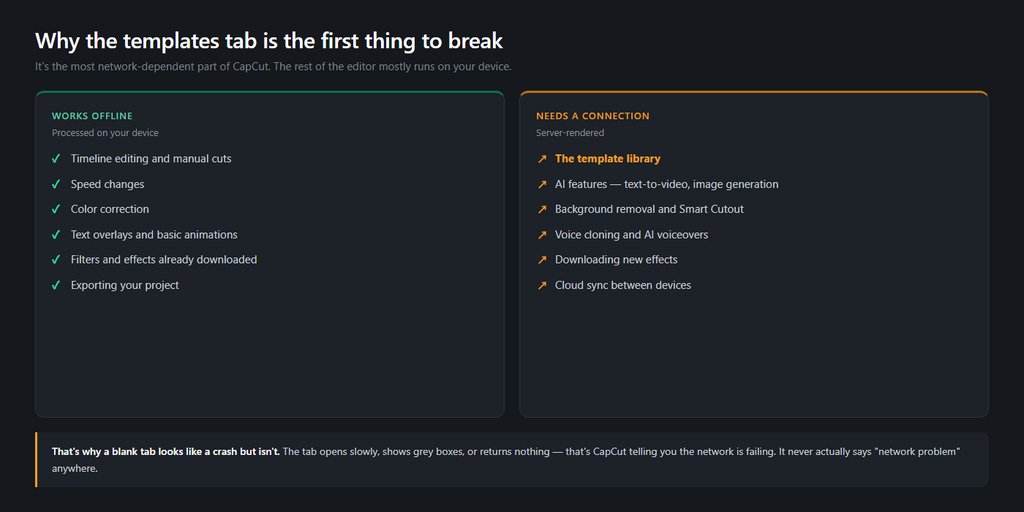
That dependency is invisible until it breaks. The tab opening slowly, showing grey boxes, or returning nothing is how CapCut tells you the network is failing — but it doesn’t say “network problem” anywhere, it just looks broken.
When to give up and use a workaround
If you’ve worked through the five fixes and templates still won’t load, you can usually find what you wanted by browsing trending CapCut templates on TikTok directly. Most popular templates are also linked from creator accounts, and applying them in CapCut becomes a “Use template in CapCut” tap from inside TikTok. That path doesn’t depend on the in-app template tab loading correctly.
FAQ
Why is the templates tab empty?
Five causes: connection, region, cache, app version, or CapCut’s servers. The first three account for almost all cases.
Will clearing cache delete my projects?
No, if you’re signed in. Projects live in CapCut’s cloud. The cache is just thumbnails and downloaded template data.
Do I need a VPN to use templates?
No, and using one often breaks templates. If you currently use a VPN, disconnect it before opening the templates tab.
Why do some templates work but others don’t?
Individual templates can be removed or region-locked. If a specific template won’t load, search for the same effect in the editor directly — most templates are just pre-arranged versions of stock effects.
Does CapCut Pro give access to more templates?
Pro templates are part of the paid library, but the free template tab depends on the same servers as everything else. Subscription doesn’t fix loading issues.