You double-click CapCut and… nothing. Or the logo appears and hangs. Or the window flashes open and vanishes before you can click a thing.
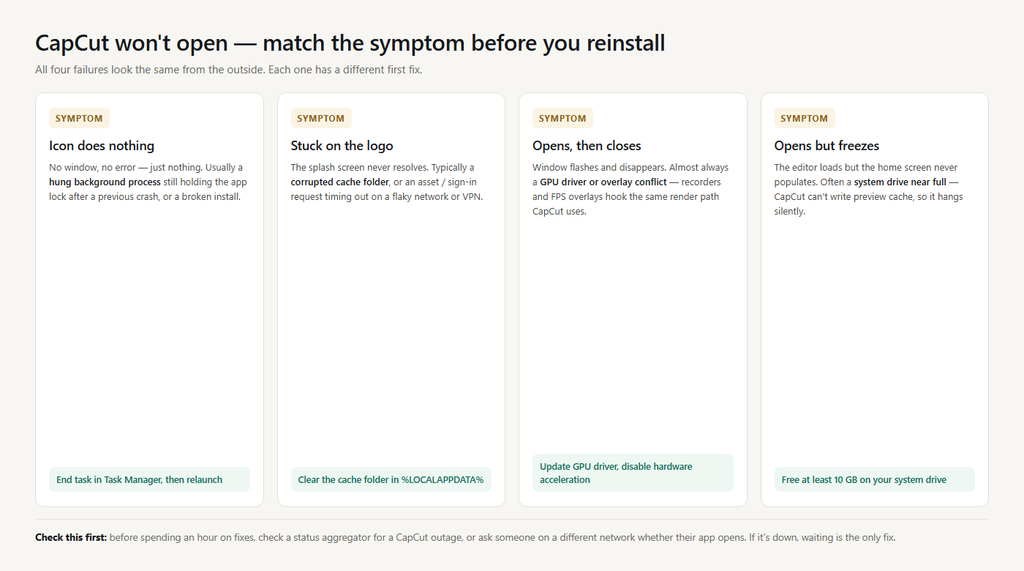
CapCut looks like a lightweight app, but under the hood it’s a full video editor: it initializes the GPU, writes preview cache to disk, checks your account token, and loads online assets. Any one of those steps failing looks identical from the outside — “it won’t open.” So before you reinstall anything, match your symptom to the cause.
- Nothing happens at all → a hung process or a broken install.
- Stuck on the loading / logo screen → corrupted cache, or a network or sign-in loop.
- Opens, then closes immediately → GPU driver or hardware acceleration conflict.
- Opens, then freezes on the home screen → a nearly full system drive, or an online asset request timing out.
Fix 1: Kill the hung process first
This is the fix most people skip, and it resolves a surprising share of “won’t open” cases — CapCut often leaves a background process running after a crash, and a new instance silently refuses to start while the old one holds the lock.
On Windows: press Ctrl + Shift + Esc, find anything named CapCut or JianyingPro, select it, and choose End task. On Mac: right-click the CapCut icon in the Dock, hold Option, and choose Force Quit.
Then relaunch. If it opens, you’re done — and you should export or back up anything you care about before it happens again.
Fix 2: Run it as administrator (a diagnostic, not a permanent fix)
Right-click CapCut and choose Run as administrator. If it launches only with elevated rights, you have a permissions problem — usually CapCut can’t write to its own cache or project folder because a security policy, an antivirus, or a previous install from a different account locked that path.
The permanent fix is to grant your normal user account full control over the CapCut folders in %LOCALAPPDATA%, or to reinstall as your own user. Running as administrator every time works, but it tends to create new permission mismatches later.
Fix 3: Clear the cache folder
A corrupted cache is the single most common reason CapCut hangs on the logo. The cache is disposable — clearing it does not delete your drafts.
On Windows, press Win + R, type %LOCALAPPDATA%, and press Enter. Find the CapCut folder, open User Data, then Cache, and delete the contents. Restart CapCut.
On Mac, the equivalent lives under ~/Library/Application Support/. On mobile, use Settings → Clear cache — and be careful to choose cache, not Clear data. Clearing data does remove local drafts.
Fix 4: Update your GPU driver, then disable hardware acceleration
Outdated graphics drivers are the classic cause of CapCut opening and immediately closing. Update from NVIDIA, AMD, or Intel directly — not through Windows Update, which often installs a generic driver.
If it still crashes on launch after updating, disable hardware acceleration. In CapCut, go to Settings → Performance and uncheck Speed up hardware encoding (and hardware decoding, if present). Restart. Software encoding is slower on export, but it’s dramatically more stable on older or integrated GPUs.
Two other GPU-adjacent culprits worth ruling out: screen recorders and FPS overlays (OBS, Discord overlay, GeForce Experience overlay, MSI Afterburner) hook into the same rendering path CapCut uses. Disable them and try again. If you run multiple monitors, testing with one display connected also isolates a display-driver conflict.
Fix 5: Check free space on your system drive
CapCut writes preview renders and temporary files to your system drive constantly. When that drive gets close to full, the app can hang at startup with no error message at all. Aim for at least 10 GB free — and check this before you reinstall, because a nearly full C: drive will make the reinstall fail too.
Fix 6: Do a genuinely clean reinstall
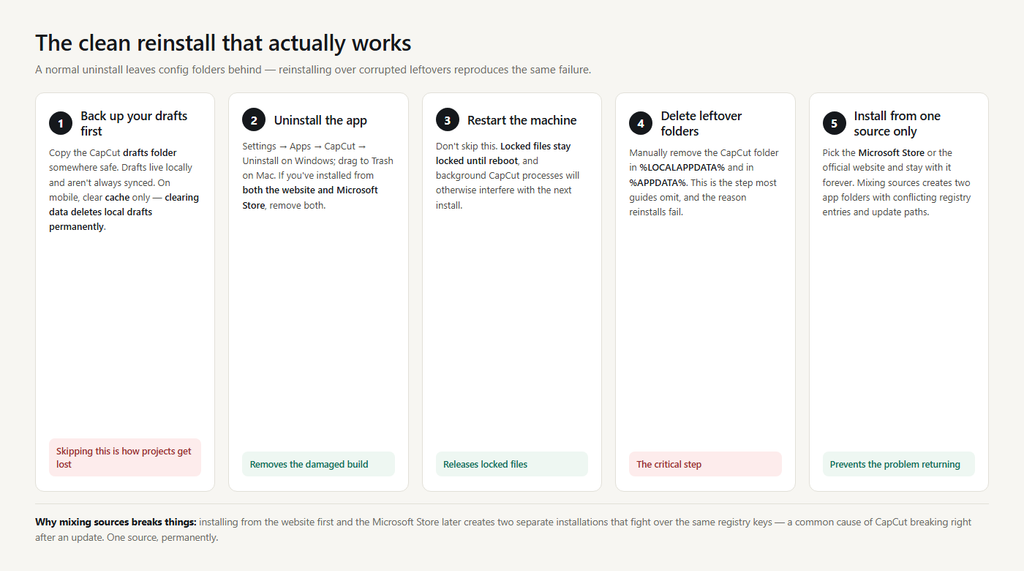
If none of the above works, the install itself is damaged. But a standard uninstall usually isn’t enough, because CapCut leaves config folders behind — and reinstalling over corrupted leftovers reproduces the exact same failure.
The sequence that actually works:
- Uninstall CapCut from Settings → Apps (Windows) or drag it to Trash (Mac).
- Restart the machine — don’t skip this. Locked files stay locked until reboot.
- Manually delete the leftover CapCut folder in
%LOCALAPPDATA%and in%APPDATA%. - Reinstall from a single, official source.
That last point matters more than it sounds. Don’t mix install sources. Installing from the website first and later from the Microsoft Store creates two separate app folders with conflicting registry entries and update paths — a well-documented cause of CapCut breaking after an update. Pick one source and stay with it. The Microsoft Store version is generally the safer choice on Windows: it updates through Windows, uses a more contained install model, and avoids most permission issues.
Before you wipe anything: protect your drafts
Draft files live locally and are not always synced. Before a clean reinstall, check whether your projects are backed up to your account. On mobile especially, clearing app data destroys unsynced local drafts permanently — clearing cache does not.
If CapCut won’t open at all and you need a project out of it, your draft files are still on disk in the CapCut drafts folder. Copy that folder somewhere safe before you uninstall.
When it isn’t you
Occasionally CapCut is genuinely down. Before you spend an hour troubleshooting, check a status aggregator like Downdetector for a spike in reports, or ask someone on a different network whether their CapCut opens. If there’s an outage, the only fix is waiting.
| Symptom | Likely cause | First fix to try |
|---|---|---|
| Icon does nothing | Hung process or damaged install | End task in Task Manager, then relaunch |
| Stuck on logo screen | Corrupted cache, or sign-in loop | Clear the cache folder |
| Opens then closes | GPU driver or overlay conflict | Update driver, disable hardware acceleration |
| Opens but home screen blank | Asset request timing out | Switch network, disable VPN |
| Opens once after reboot, fails later | RAM pressure or background conflict | Close heavy apps before launching |
| Started after an update | Partial or mismatched update | Reinstall from one official source |
FAQ
Will reinstalling CapCut delete my drafts? Uninstalling usually leaves local drafts on disk, but “usually” isn’t a backup. Copy the drafts folder out first. On mobile, clearing app data removes them; clearing cache doesn’t.
Why does CapCut only open when I run it as administrator? Permissions on its cache or project folder are blocked for your normal account. Fix the folder permissions rather than relying on admin mode.
CapCut worked yesterday and won’t open today. What changed? Most often a Windows or driver update landed overnight, or an automatic CapCut update partially applied. Update your GPU driver, then reinstall if needed.
Is there a web version if the desktop app won’t start? Yes. CapCut’s web editor runs in a browser and covers most basic editing. It’s a reasonable stopgap while you fix the desktop install — and it can open projects saved to your account.